AI Ticketing Systems for IT: What ITSM-Native AI Actually Looks Like
Category
AI Automation
Uncategorized
.svg)
Category
An AI ticketing system for IT is not a chatbot stapled to your service desk. It is an architecture that classifies, routes, and resolves IT support tickets using large language models trained on your ticket history, integrated with your CMDB, and connected to your change management workflows, with no human touching most requests. When built correctly, it autonomously closes 76% of L1 tickets. The problem is that most of what gets sold as "AI ticketing" was designed for customer support, and IT teams are buying the wrong product.
Most buyers searching for an AI ticketing system encounter content from Zendesk, Freshworks, and similar vendors. That content is accurate for customer support. But IT tickets are structurally different. They carry CMDB dependencies, SLA tiers determined by business criticality, change-management linkages, and security-classification requirements that customer-support AI has no concept of. When your network team gets routed a password reset because the AI couldn't tell the difference, that is not an AI problem. That is a vendor fit problem.
This post is about what ITSM-native AI actually does, why the difference matters for your service desk, and how to evaluate any platform before you commit to it.
An AI ticketing system uses large language models and workflow automation to handle the full lifecycle of an IT support ticket, from the moment a user submits a request to the moment it is resolved and documented.
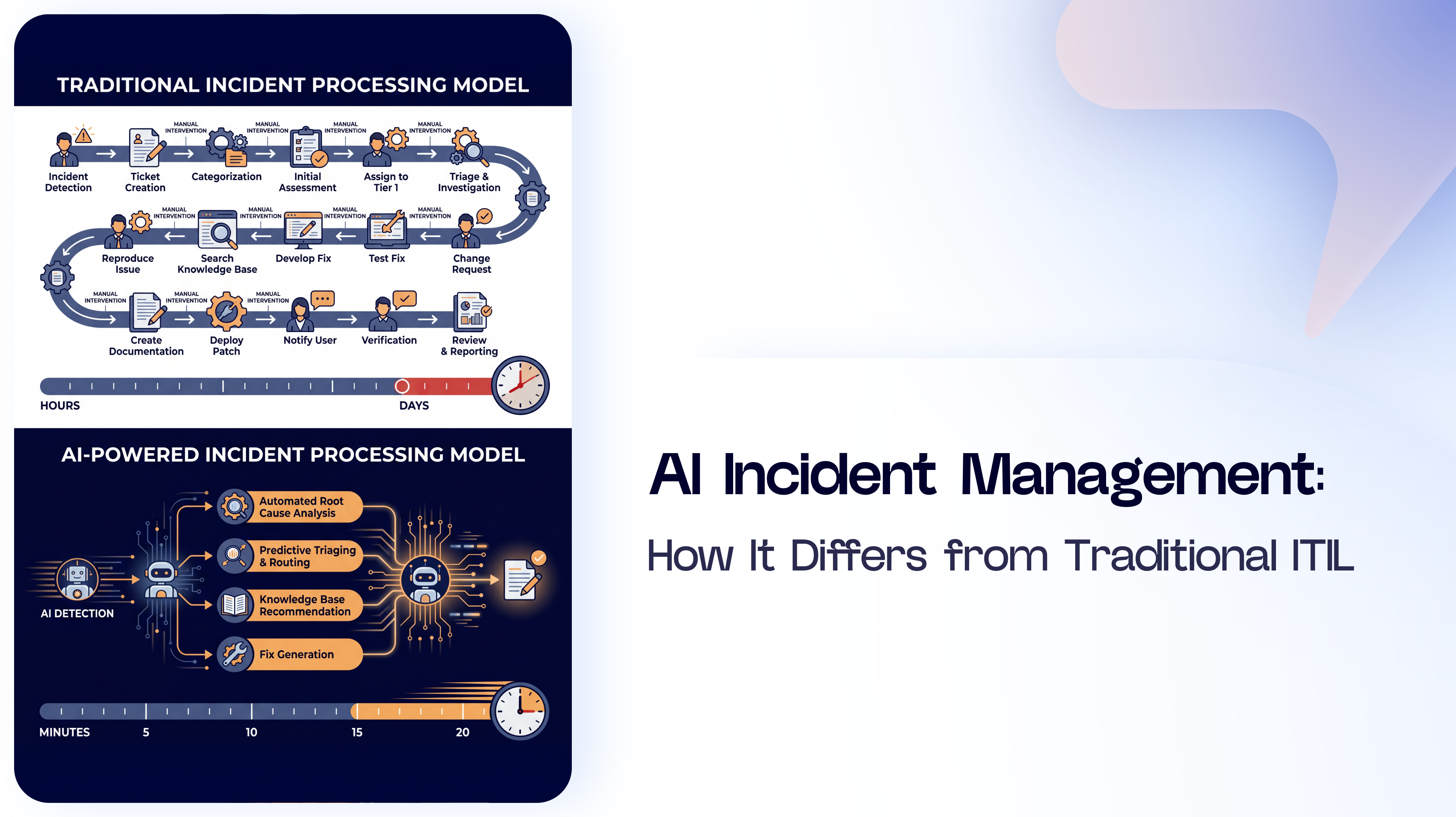
The specific work it does: classify the ticket by category and priority, route it to the right team or resolve it autonomously, suggest or apply known fixes from your knowledge base, detect patterns across multiple tickets that indicate an underlying problem, and generate resolution notes and knowledge articles automatically when a ticket closes.
In practical terms, a well-implemented AI ticketing system means your team stops manually triaging a queue and starts handling only the tickets that genuinely require human judgment. According to HDI benchmarking data, the cost per IT service desk ticket in North America ranges from $6 to $40, depending on the level of manual handling involved. The ones sitting at the top of that range are largely tickets that AI should be resolving before they ever reach a human.
The qualifier matters: for IT. Customer support AI platforms do something similar, but for external customers rather than internal infrastructure. The data they train on, the integrations they prioritize, and the logic they apply are built around CRM records and customer history. IT tickets live in a different environment entirely.
This is the part most vendors skip. Customer support and IT support both involve a user submitting a request and an agent resolving it. The surface similarity is why vendors market the same platform to both audiences. The underlying difference is why that approach creates problems.
The result when you use the wrong platform: your team spends time correcting misrouted tickets, your CMDB never gets used in routing decisions, and your SLA reporting is inaccurate because the AI doesn't understand your priority tiers.
Here are the five capabilities that distinguish ITSM-native AI from an AI layer built for something else.
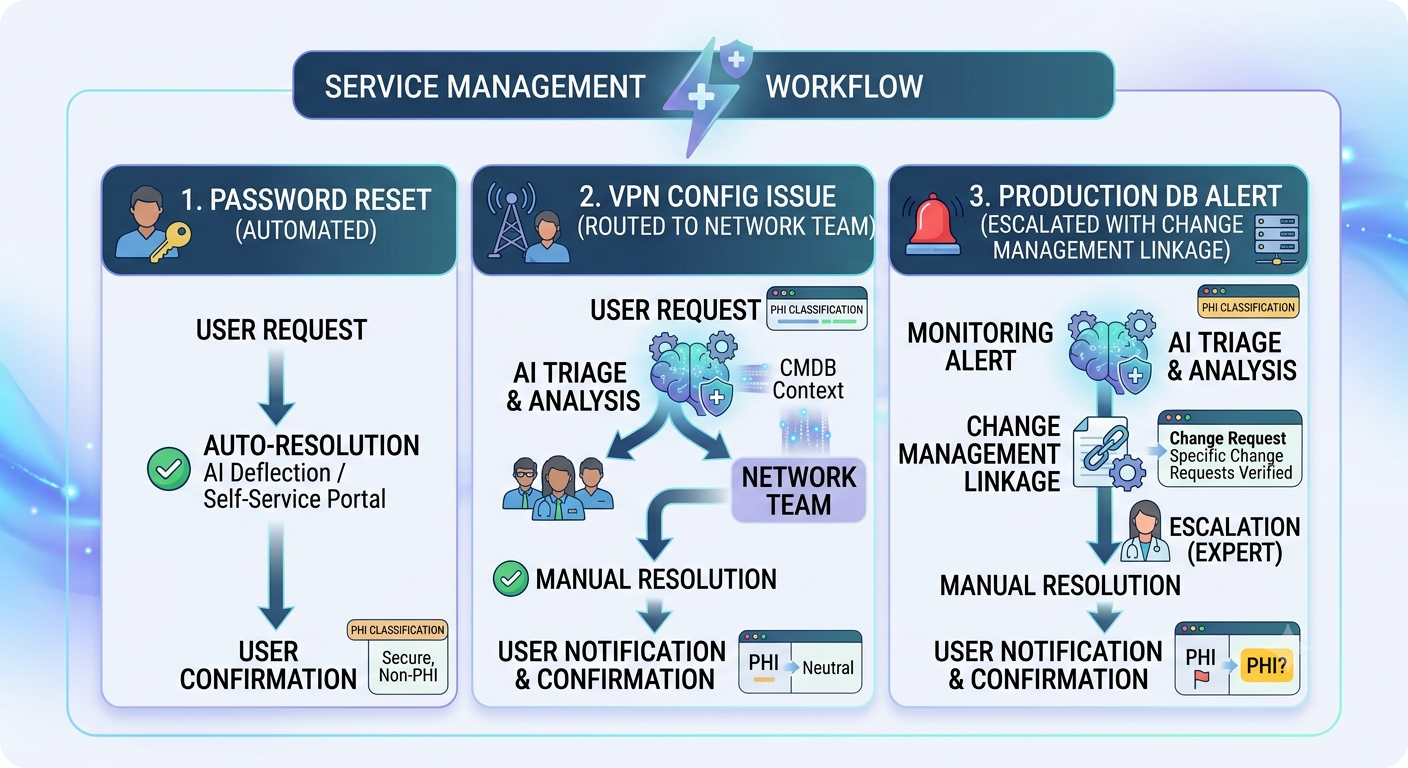
1. Predictive ticket classification with IT context. The AI classifies incoming tickets before they enter any queue. Not just "hardware" or "software", it identifies the specific category, severity, and likely resolution path based on ticket content and historical patterns. It distinguishes a password reset from an account lockout from an MFA failure, even when users describe all three in identical terms ("I can't log in"). Each routes differently.
2. CMDB-aware intelligent routing. When a ticket requires human attention, the AI routes it to the appropriate team, attaching the relevant CMDB records. A printer failure is routed to the endpoint team along with the device's maintenance history. A connectivity issue routes to networking, with the affected network segment identified. Routing logic that ignores CMDB data is just keyword matching with extra steps.
3. Autonomous resolution for repeatable requests. Password resets, software access provisioning, hardware swap requests, VPN profile updates- these are the tickets that consume the most L1 capacity and require the least human judgment. An ITSM-native AI resolves these end-to-end, including the backend actions (resetting the password, provisioning the access), without a ticket ever reaching the queue. Servicely's autonomous resolution rate across these categories runs at 76%.
4. Cross-ticket pattern detection. This is where AI moves from reactive to proactive. When ten users in the same building submit connectivity tickets within an hour of each other, that is not ten separate incidents; that is one problem with nine duplicate tickets. ITSM-native AI detects the pattern, groups the tickets under a single problem record, and notifies the infrastructure team before the eleventh user submits theirs.
5. Knowledge article generation from resolved incidents. Every resolved ticket is a knowledge asset. ITSM-native AI automatically writes the resolution article when a ticket closes, adds it to the knowledge base, and surfaces it as a suggested fix the next time a similar ticket comes in. The knowledge base grows without anyone being assigned to maintain it.
Explore how these capabilities work inside a live environment on the Servicely ITSM platform.
ServiceNow launched Now Assist. Freshservice launched Freddy AI. Both are real products. Both have genuine AI capabilities. And both share a structural constraint that limits what they can do.
These platforms were architected in the 2000s and early 2010s, before large language models existed. Their data models, workflow engines, and integration layers were designed for human-driven processes. AI was added later, as a layer on top of that architecture, not as a foundational component of it.
This matters because the AI can only work with what the architecture exposes to it. If your ticket categorization logic lives inside a set of routing rules that predate the AI integration, the AI cannot touch those rules. If your knowledge base is structured for human navigation rather than LLM retrieval, the AI will surface suboptimal answers. If your change management records are not available to the AI in real time, it cannot factor them into routing decisions.
Dion built Servicely from scratch in 2015 specifically because he saw this problem coming. He had spent years in the ServiceNow ecosystem, with 400+ deployments, and could see that bolting AI onto a pre-LLM platform architecture would hit hard ceilings. AI native means the LLM is part of the data model from day one. It runs across every workflow, not as an add-on to selected ones.
The practical difference: Now Assist can suggest a knowledge article. Servicely's AI can resolve the ticket, update the CMDB record, provision access, and write the knowledge article because it has direct access to every part of the workflow, not just the parts the legacy architecture exposed to it.
This also applies to Servicely's second deployment model. For organizations on ServiceNow that are not ready to rip and replace- too many customizations, too much organizational change to absorb- Servicely can operate as an agentic AI overlay on top of your existing platform. You keep ServiceNow as the system of record while Servicely's AI handles the resolution layer. The bolt-on problem disappears because the AI is no longer trying to work around the host platform's constraints.
For a deeper look at how agentic AI changes the service desk model, read What Is Agentic AI in ITSM and From Chatbots to Agentic AI.
See Servicely's AI resolve a real IT ticket in under 60 seconds, book a demo.
Every vendor at this stage of the market has an AI story. Some of them are real. Here is how to tell the difference. Seven questions to ask in any evaluation.
1. Does it understand your CMDB, or does it work around it? Ask the vendor to demonstrate how to route a ticket that depends on a configuration item, a specific server, a network segment, or an endpoint. If the AI can pull CMDB context into the routing decision, it was built for ITSM. If it routes based on category keywords alone, it was not.
2. Can it link tickets to change management records in real time? During a change window, incident handling changes. Ask whether the AI can detect that an incident occurred during an active change and adjust its routing and escalation logic accordingly. Most customer support tools cannot answer this question coherently.
3. Does it learn from YOUR ticket history, or just a generic training set? Generic training data gives you generic results. The resolution patterns, terminology, and escalation paths that matter to your IT team are specific to your environment. Ask how the platform is trained on your historical tickets and how quickly it improves after deployment.
4. Can your team configure it without writing code? If every workflow change requires a developer or a consultant, the AI will be outdated within months of deployment because no one will maintain it. Ask to see how a non-technical IT administrator configures a new routing rule or updates a resolution workflow.
5. Which LLM powers it, and can you switch? LLM capabilities are improving fast. A platform locked to a single model will fall behind a platform that can route different ticket types to different models based on cost and accuracy.
6. What is the autonomous resolution rate for L1 tickets? Not the deflection rate. Not the containment rate. The autonomous resolution rate, tickets fully resolved by AI without human intervention, confirmed by the user. Ask for this number from live production deployments, not a demo environment. Servicely's is 76%.
7. What is the implementation timeline, and what does it require from your team? A platform that requires 6 months and a consulting team to go live will spend the first year of its life half-configured. Ask for a timeline with milestones, not a range. Ask what the vendor handles versus what your team handles.
For self-service capabilities that complement AI ticketing, the Servicely self-service portal reduces inbound ticket volume before requests even enter the queue.
Most "AI ticketing" content will tell you to pick the platform with the best LLM and the cleanest interface. That advice misses the point.
The question for IT teams is not which AI is the cleverest. It is what AI was built to understand: your environment, your CMDB, your change management records, your SLA tiers, your infrastructure topology. A customer support AI tool can look impressive in a demo and fail in production because it never understood what an IT ticket actually requires.
AI native means the AI was not added later. It runs across every workflow, connects to every data source that matters for IT, and improves on your ticket history, not someone else's. That is the architecture that gets you to 76% autonomous resolution. Everything else is lipstick on a pig.
Ready to see what AI-native ITSM looks like in your environment? Request a trial of Servicely, or explore th full ITSM platform to see what you'd be replacing.
Dion Williams is CEO & Founder of Servicely, an AI-native ITSM platform for mid-enterprise organizations. Before founding Servicely, he ran a ServiceNow reseller business that brought ServiceNow to the Australian market and completed 400+ enterprise deployments. He built Servicely in 2015 after seeing mid-market IT teams consistently priced out of modern service management. Connect with Dion on LinkedIn.

.png)


